


Myto CZ
Billien OBU 5051
Basic User Guide
Introduction
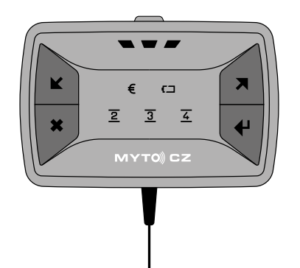
This Basic User Guide will help you install and operate the Billien OBU 5051 on-board unit, which is an “electronic device” in accordance with Section 22(2) of Act No. 13/1997 Coll. on Roads, as amended, and hereinafter referred to as OBU. For detailed instructions, please visit www.mytocz.eu.
For more information on the obligations of vehicle operators and drivers with regards to toll collection, the Electronic Toll System (SEM) in the Czech Republic and use of the OBU:
• Visit the SEM website at: www.mytocz.eu
• Call the SEM customer service line: +420 243 243 243
General information and notices
• The OBU is intended only for operation in the SEM and its use is mandatory in vehicles obliged to pay tolls on toll roads in the Czech Republic.
• The OBU is the property of the Czech Republic and is only leased to a vehicle operator. The vehicle operator is obliged to ensure that it is not destroyed, damaged or lost. In the event of destruction, damage or loss of the OBU, you incur the obligation to compensate for the damage.
The OBU is non-transferable. • In your vehicle, only use the OBU that has been issued for it.
• The issued OBU is intended for temporary installation. If you need a permanent installation kit (for example, if your vehicle is not equipped with a cigarette lighter socket in the driver’s cab), contact the SEM customer service line or visit the SEM website for further information.
• If your vehicle has fully metallised glass, contact the SEM customer service line or visit the SEM website for detailed instructions.
• Use the OBU only as described in this user guide. Do not cover the OBU or try to influence its function. Under no circumstances should you try to open the OBU.
Package contents
First, make sure you that your issued package contains:
• OBU with the power cord connected.
• OBU holder with four suction cups for installation on the vehicle windscreen.
- Disposable wet wipe to clean the windscreen spot and the suction cup on the OBU holder.
• This basic user guide. If the package is not complete, visit the nearest SEM POS; a list of SEM POSs can be found on the SEM website.
Installing the OBU
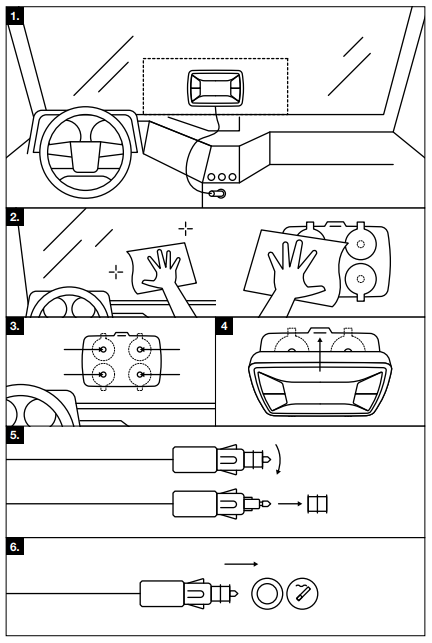
1. Choose the right spot to install the OBU on your vehicle’s windscreen so you do not restrict your vision when driving. At this spot, the windscreen must not be metallized and there must be no external parts of the vehicle such as windscreen wipers, spoilers, auxiliary headlamps and the like on the spot from the outside of the windscreen. Also note that the power cord is led from the OBU downward and it is not advisable to bend it by force. (Figure 1) The vehicle driver shall be responsible for the correct placement of the OBU.
2. Clean the selected installation spot on the vehicle windscreen and the suction cup on the OBU holder with the disposable wet wipe provided (Figure 2). Be mindful of the environment and after use, dispose of the wipe as normal household waste.
3. Turn the OBU holder so that the two OBU insertion holes on the holder edges are down. Press the holder with the suction cups firmly onto the windscreen. Pull the holder towards you to make sure that all suction cups hold properly (Figure 3).
4. Rotate the OBU so that the cord faces down. Insert the OBU into the holder by first inserting the two tabs on the bottom of the OBU into the holder holes, and then, by moving the OBU towards the windscreen, click on the top. Pull the OBU towards you to make sure that it is properly fixed in the holder (Figure 4).
5. If your vehicle has a cigarette lighter socket with a smaller diameter, twist the red element at the end of the plug of the OBU power cord (Figure 5). Store the red element carefully as it will be required to be returned with the OBU.
- Plug the power cord plug into the cigarette lighter socket (Figure 6).
Using the OBU
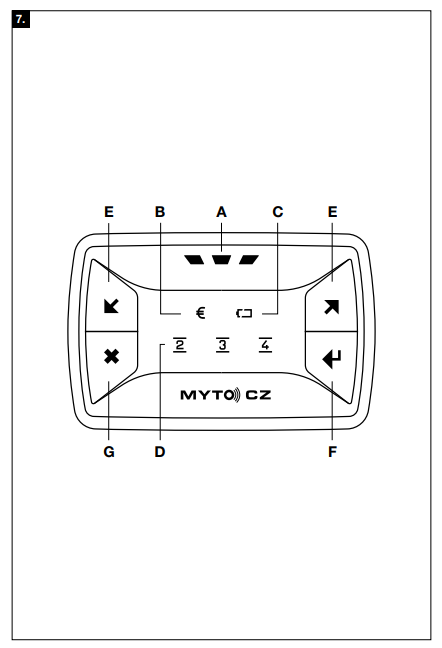
The OBU control and signalling elements are illustrated on Figure 7.

Main status indicator
The OBU main indicator (A) shows the overall OBU status and its readiness for operation. If everything is fine and the OBU is ready to operate, this light is a steady green light. If the main status indicator is flashing green, pay attention to the toll account status indicator. If the red light comes on, stop driving, contact your SEM customer service line and follow the directions to the nearest SEM POS.

Toll account status indicator
The green light indicates that everything is fine. If the indicator light turns yellow (at the same time, the main status indicator (A) is flashing green), this indicates a warning about a possible problem with your toll account. In prepay mode, this is a warning that your prepaid toll balance is very low and you need to make a credit top up as soon as possible. In the postpay mode, this is a warning that the amount of toll payable is already approaching the value of the bank guarantee provided and its increase should be considered. If the red light comes on, stop driving, contact your SEM customer service line and follow the directions to the nearest SEM POS.

Power status light
A permanent green light indicates that the battery is fully charged and the OBU is properly connected to the power supply. A permanent yellow light indicates that the battery is charging; after charging, the colour turns green. If the light is a permanent red, there is a problem with the battery – visit the nearest SEM POS to resolve the problem. The power status light flashes to indicate that the OBU is not receiving power. Check that the cigarette lighter socket provides power and that the power cord is properly connected to the cigarette lighter socket. If everything is fine and the indicator is still flashing, please visit the nearest SEM POS to solve the problem.
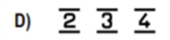
Axle number indicators
They permanently show the set number of axles of the vehicle/vehicle combination. The meaning of the indicators is as follows:
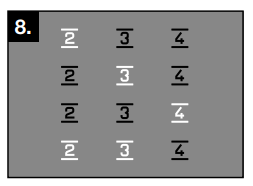
Two axles
Three axles
Four axles
Five axles and more
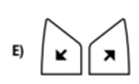
Axle setting buttons
They are used to set the current number of axles of the vehicle/vehicle combination.
Button to invoke OBU
It is intended to invoke OBU communication. Use the button if requested by the SEM POS staff or the SEM customer service line operator. To initiate a communication, press and hold the button until all of the axle number indicators (D) flash green and the power status indicator (C) and the toll account indicator light (B) go out; the OBU will sound an alarm. When communication is complete, the OBU issues an audible alert and the power status light (C) and the toll account status indicator (B) displays the result of the communication for 10 seconds – green light in case of successful completion of communication or red light in case of a communication error. Subsequently, all the indicators light up according to the current situation.

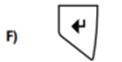
Button for switching off/on sound alerts
The OBU provides sound alerts (for example, when you press a button) and sound warnings. The button is used to turn off/on sound alerts; deactivation of sound warnings is not possible. To turn the sound alerts off, press the button; the OBU will give a sound alert as a confirmation. Use the same procedure to turn the sound alerts on.
• To remove the OBU from the holder, gently push the tab on the top of the holder towards the windscreen and tilt the OBU out of the holder (opposite the arrow on Figure 4).
• To take the holder off the OBU, lift the suction cups (preferably by pulling on the suction cup protrusion) to release the holder. Do not use sharp objects that could damage the suction cups.
• Software and OBU data can be updated remotely. This will turn off all the indicators. In principle, the update does not last longer than one minute. Do not start driving until the main status indicator (A) turns green.
Before driving
• Make sure the power cord is properly plugged into the cigarette lighter socket.
• Check that the main status indicator (A) is green and the toll account indicator light (B) is green (or yellow – see chapter Using the OBU).
• Check the set number of axles of the vehicle (including trailers, semi-trailers, etc.) on the axle number indicators as shown on Figure 8 in (D).
If the number of axles does not match the current configuration of your vehicle/vehicle combination, set the correct number of axles using the buttons (E). Only the values acceptable to your vehicle can be set. The driver is responsible for setting the correct number of axles.
Caution: The number of axles must be set in a stationary vehicle. The OBU buttons are locked while driving.
When driving
When driving, occasionally check that:
• the indicator lights did not change to red – especially the main status indicators (A) and toll account status indicators (B);
• the power cord plug is still properly plugged into the cigarette lighter socket.
If you come from abroad, where the OBU does not have to be connected to the power supply, connect the OBU power cord to the cigarette lighter socket before entering the Czech Republic (at least 30 km before the border crossing) to ensure proper OBU operation. After crossing the border, perform the checks as described in chapter Before driving.
After leaving the territory of the Czech Republic, the main status indicator (A) lights up yellow until the OBU completes the ongoing activities and then goes out. You can disconnect the OBU from the cigarette lighter socket after the main status indicator has (A) gone out.
After driving
No inspection or operation of the OBU is required after the end of driving. After a certain period of inactivity, the OBU automatically enters sleep mode (the indicators in this state are off).
OBU maintenance
The OBU does not require any maintenance. In case of dusting or soiling, the OBU can be cleaned with a cloth moistened with lukewarm water. Do not use aggressive or abrasive cleaners or solvents to clean the OBU, nor immerse the OBU in any liquid.