


Passango OBU
PASSango
ON-BOARD UNIT: USER GUIDE
- CONNECTION
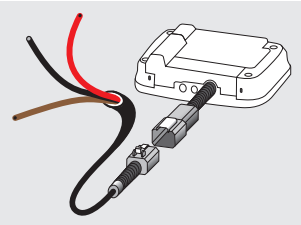
An on board-unit (OBU) must be connected to the fuse box as specified by the manufacturer.
IMPORTANT!
The cable supplied for a stationery OBU comprises 3 wires:
Brown: live
Red: constant power supply +12-24V
Black: ignition +12-24V connected to the engine.
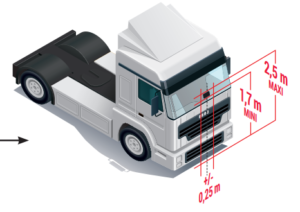
To ensure its proper operation, OBU must be constantly connected. OBU must be placed on the windscreen as shown in the picture.
- STARTING THE OBU
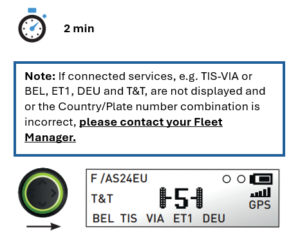
Once your OBU is connected, the automatic initialisation procedure starts (around 2 mins).
1. Checks
2. The central navigation button changes its colour.
3. Your OBU will not display any information for over 20 seconds.
4. The navigation button is green and all subscribed services are displayed on the screen: your OBU is operational.
- CHECKS
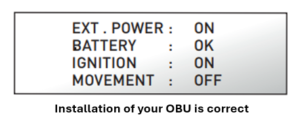
With the up/down navigation button scroll through the control menu to make sure your OBU has been installed correctly.
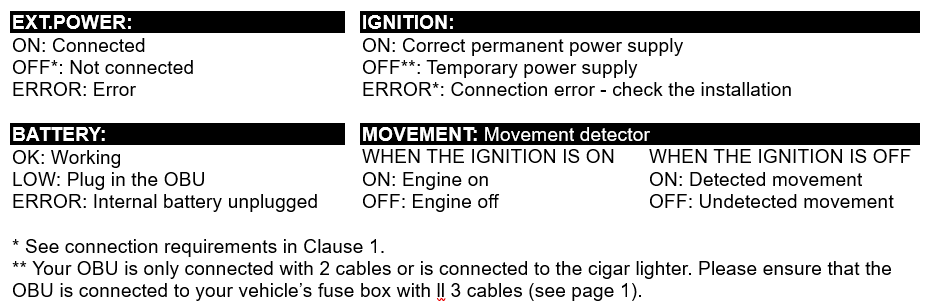
OBU MAIN SCREEN
- Country and Vehicle Registration Number
- Power source
O cigar lighter
OO fuse box - Battery status
- Status of the GSM network
- GPS status
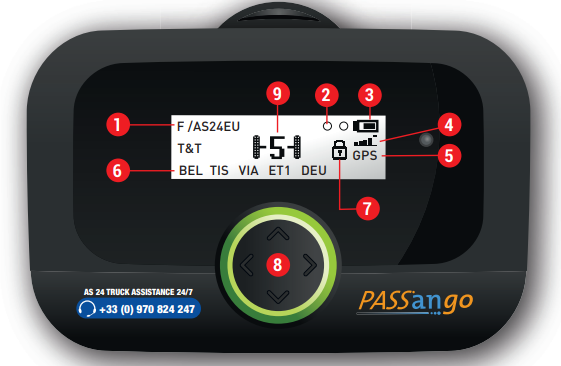
- Services (1)
BEL: Belgium VIAPASS
TIS: France + Liefkenshoek tunnel (Belgium)
VIA: Spain + Portugal
ET1: Austria + Storebaelt bridge (Denmark) and Øresund bridge (Sweden)
DEU: Germany LKW-Maut
T&T: Geolocation services - Blocked
- Navigation button
Up and down button: menu and settings
Left and right button: control and settings menu (axles, weight, tolling, sound…) - Number of axles in use (tractor + trailer)
(1) Before your journey, find out about each country’s official regulations. If you have any questions, get in touch with your usual point of contact.
❗️Operate the OBU only when the vehicle is stationary.
OBU STATUS
The main screen and navigation button’s colour demonstrate your OBU status.
✅ Operational
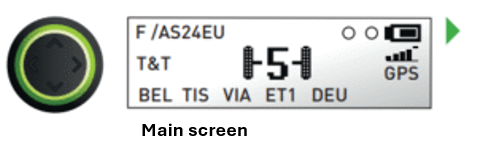
Your OBU is processing the services demonstrated on the screen.
⚪️ Stand-by mode (non-operational)
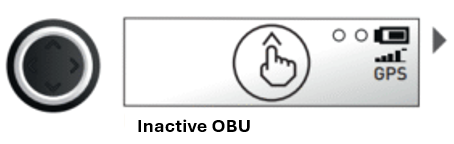
Your OBU is inactive, its customization is still in progress. Hold down the top button to commence activation. If the screen still displays the same, get in touch with your Fleet Manager or your usual point of contact to check the settings.
❌ Non-operational
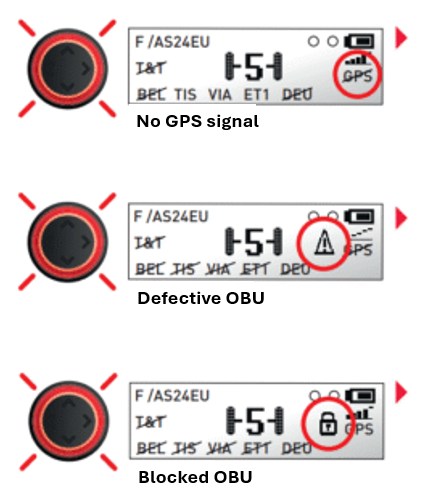
Your OBU is not receiving a GPS signal. For good GPS reception, drive in an open area, away from any tunnels, buildings, forests or warehouses… Note: on a Belgian or German road network, prolonged absence of GPS reception will be indicated by the unit flashing red.
Your OBU is defective, all services are non-operational. See the procedure for malfunction.
Your OBU is blocked; to unblock it, get in touch with your Fleet Manager or your usual point of contact.
DRIVING REGULATIONS
UPDATE THE NUMBER OF AXLES
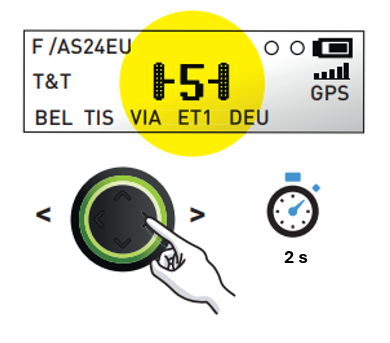
The number of axles displayed on your OBU must at all times be equal to the total number of axles that the vehicle has (tractor + trailer). Long press (2 sec) right > or left <. To change the number of axles: scroll through the number of possible axles and select the correct one.
If toll domains of Germany and Belgium are activated, new screens will appear.
FOR GERMANY*
Access the settings menu using up/down navigation button:
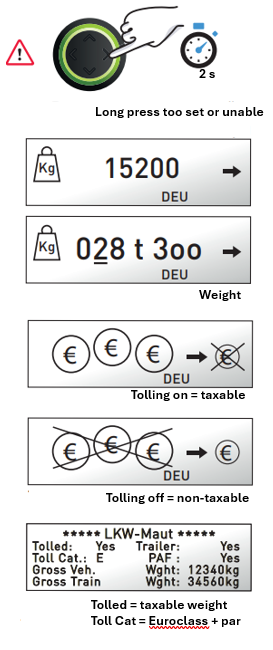
– Set the vehicle’s current maximum train weight.
This weight is the arithmetic mean of the Maximum Permissible Laden Weight (MPLW) and the Gross Towing Weight (GTW) of your vehicle. Set the weight to the upper or lower limit in 100 kg increments to comply with current regulations in relation to weight classes.
– Enable or disable tolling.
Before taking to the road, check the OBU’s configuration. Tolling is enabled by default. The “DEU” service is shown on the main screen.
EXEMPTION: You can disable tolling if you have an official exemption. Illegal enabling or disabling incurs your liability in respect of the German toll charger.
– Check information about your vehicle.
*In Germany, the axles stated on the OBU must be counted.
FOR BELGIUM
Access the settings menu using up/down navigation button:
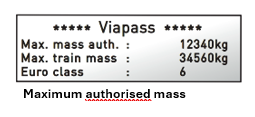
– Check information about your vehicle.
Toll use(1)
➡️ Take lanes without height restrictions.
➡️ Respect the road signs and safety regulations.
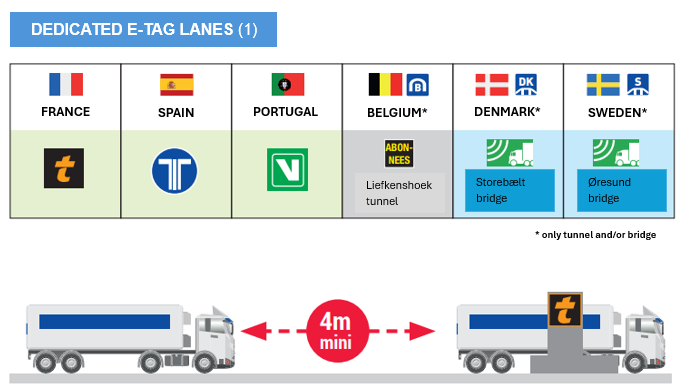
In the toll lane, keep a distance of 4 metres between your vehicle and the vehicle in front of you.
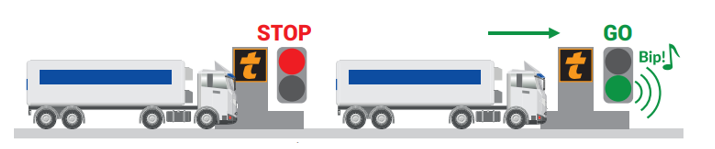
Proceed when the light is green and the barrier lifted.
NEED HELP?
Press the call button to contact an operator.
(1) Motorways in France, Spain, Portugal, Italy, Liefkenshoek tunnel in Belgium and Øresund and Storebælt bridges in Sweden and Denmark.
❗️Procedure for malfunction ❗️
In the event of your OBU being defective – contact your support, call TRUCK ASSISTANCE 24/7 and get a temporary toll solution for the country in which you are driving until you receive your new PASSango OBU. (Please note the regulatory deadlines in each country)
In the event of loss or theft – call TRUCK ASSISTANCE 24/7 to block your on-board unit.
📞 AS 24 TRUCK ASSISTANCE 24/7 – +33 (0) 970 824 247 (toll-free)
If your OBU is malfunctioning – call Truck Assistance to assess the situation and find possible solutions.
Truck Assistance will block your OBU and reports its malfunction to the Participating Network, if necessary. For this purpose, do as follows.
1. Disconnect your OBU from the connector located on the power cable along the windscreen.
2. Unclip the OBU from its base.
3. Place it in its original packaging or a container of the same type.
4. Send the package containing the OBU to the following address:
ESAT CATOUEST (PASSANGO AS 24)
12, RUE BOBBY SANDS – CP 3213
44805 SAINT-HERBLAIN cedex – FRANCE