


Shell
Toll4Europe On Board Unit (T4E-OBU)
User Manual
- Quick Start
1.1 Display on the On-Board Unit in Germany (DEbag)
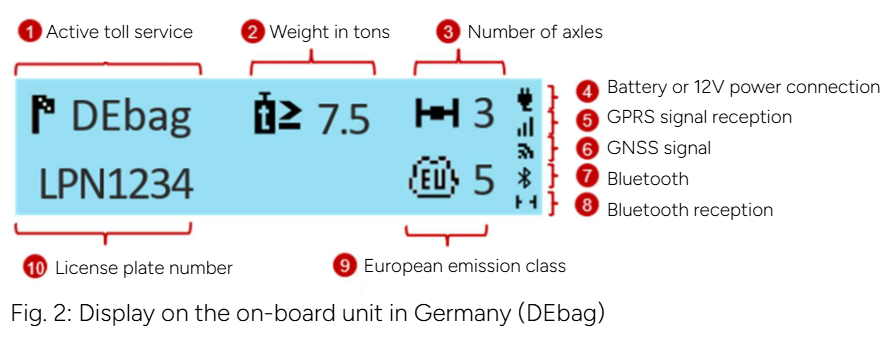
When driving in an area where the on-board unit is activated, the display continuously shows the active toll service (1) and the license plate number (10). Weight (2), number of axles (3), and Euro emission class (9) are displayed if this information is relevant for the active service.
- Weight is displayed only in Germany, Belgium, Italy, and Switzerland.
- The number of axles is the total of tractor and trailer axles; this parameter is not displayed in Belgium or when driving through tunnels.
Symbols for power connection type (4), GPRS signal (5), and GNSS signal (6) are always displayed.
When Bluetooth is activated, the corresponding symbol (7) is shown. An active Bluetooth connection between the on-board unit and a mobile device is displayed in the lower right corner of the screen (8).
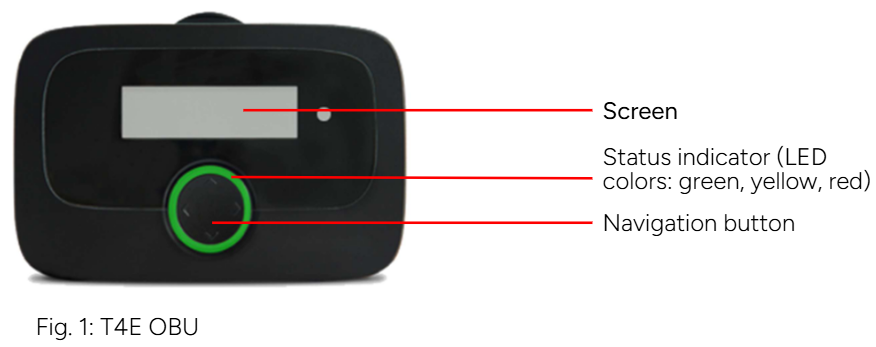
1.2 Status Indicator (LED)
Green LED:
The on-board unit is ready for toll payment. You may drive.
Yellow LED:
The on-board unit is not personalized, or the toll service for the current location is not (yet) paid/activated, or there is no toll system in this area (e.g., Netherlands), or the local toll service is not available on the device.
Red LED:
Critical issue. Do not drive. Contact customer support.
Exception: After 30 minutes without a GPS signal, the LED turns red.
→ If you are in a tunnel or garage, move to a location with GPS signal.
LED off:
The on-board unit is inactive (e.g., in sleep mode). It will activate when movement starts or power is connected.
1.3 First Use of the On-Board Unit
To activate the device, connect it to power!
- The LED remains red until the system finishes booting.
- Then it turns yellow while vehicle parameters (license plate, weight) and paid services are downloaded via the mobile network (over-the-air personalization).
- Finally, the LED turns green if toll service is paid for the current location.
Ensure:
- The device receives a strong GPRS signal during personalization.
- The device is in an area with good GNSS/GPS reception so it can determine the country.
(Move to an open space if needed. Reposition the device slightly if necessary.)
The on-board unit can also receive updates over-the-air.
If you cannot follow the instructions (e.g., your menu looks different), contact support. Always use the latest version of the manual provided by Toll4Europe.
Before the first trip, check that the license plate is correct.
Language Selection
- Press (or any button) on the navigation panel and hold for at least 2 seconds to open the main menu.
- Use the buttons to select Language and confirm.
- Select the desired language (German, English, etc.) and confirm.
- The device will beep and the language will change.
Axle Configuration
The driver is responsible for correctly entering the number of axles, including trailer axles. This can be done at any time.
- Press and hold a navigation button for at least 2 seconds to open the main menu.
- Select Trailer Axles and confirm.
- Choose the correct number of trailer axles and confirm.
- The device will beep to confirm. Close the menu.
Total Weight Configuration
In Germany and other countries (e.g., Austria, Bulgaria, France), the driver is responsible for setting the correct total vehicle weight.
- Press and hold a navigation button for at least 2 seconds to open the main menu.
- Select Total Weight and confirm.
- Choose the correct value and confirm.
- The device will beep to confirm. Close the menu.
The total weight is the maximum permitted weight of the truck with the currently attached trailer.
1.4 During the Trip
- The device must be securely mounted.
- It must be visible from outside and not covered.
- Do not install it near other devices (e.g., GPS, airbags, other OBUs).
- It must remain connected to power at all times.
- Do not operate the device while driving.
- Follow traffic rules.
For optimal toll lane detection (DSRC):
- Keep a 4 m distance from the vehicle ahead.
- Follow toll lane signage.
- Pass only when the traffic light is green.
1.5 Emergency Actions if the Device Fails in Toll Lanes
If the device fails when entering or exiting a toll station, the driver must pay using an alternative method.
The driver must (and in France is required to) carry an alternative payment method:
- Fuel card
- Credit card
- Cash